Beyond YouTube Studio: YouTube Analytics Tools for Creators
YouTube Studio does an excellent job of showing what is happening inside your channel. But YouTube Analytics data alone is not enough to build a comprehensive content strategy. A channel does not grow in a vacuum - it always operates within a specific niche and competes for the attention of the same audience.
To understand a channel's potential and determine its direction, you need to see what is happening around it: which topics are gaining popularity, which formats competitors are using, who is growing quickly, which videos continue to generate views months after publication, and where there is still room for growth within the niche.
That is why effective YouTube work requires combining two levels of data. The first is internal analytics for your own channel: views, retention, CTR, traffic sources, audience data, and other metrics available in YouTube Studio. The second is external context: the competitive landscape, the performance of other channels, popular formats, topics, and content patterns.
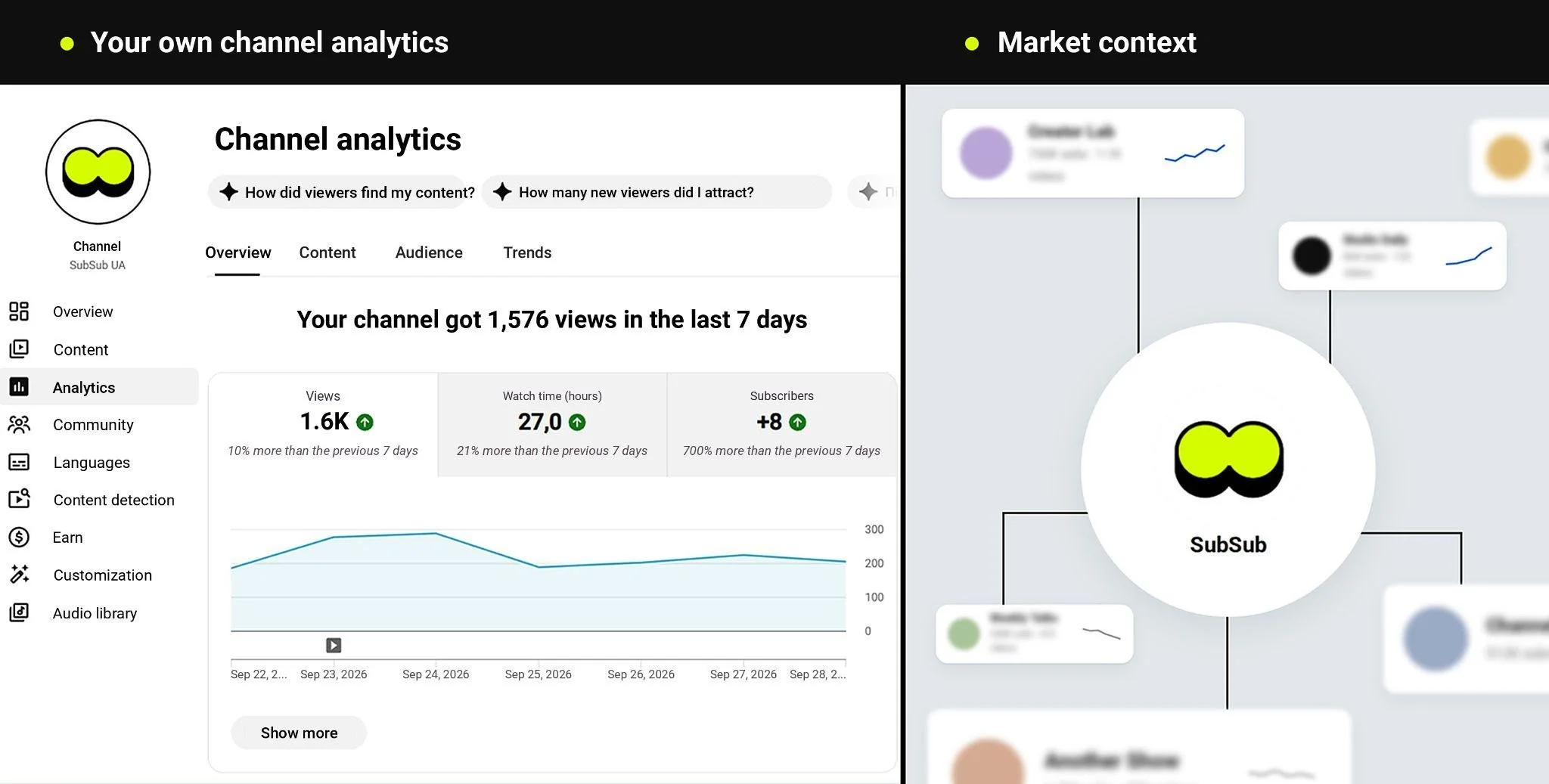
In this article, we explore how YouTube Analytics works and which tools are available beyond YouTube Studio - from getting a quick overview of the market and finding competitors to conducting in-depth research into channels and content.
YouTube Studio: in-depth data about your own channel, but not the market
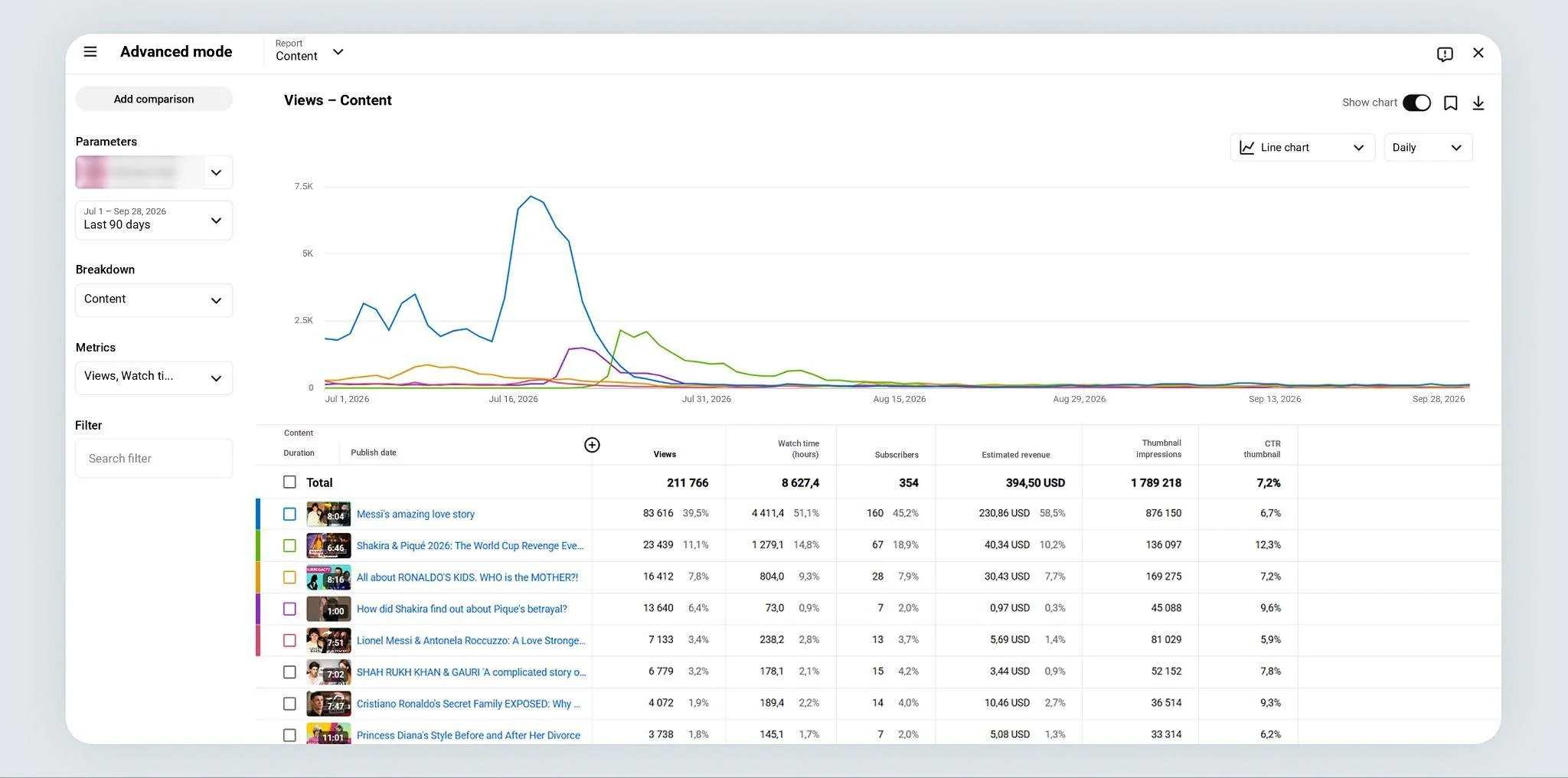
YouTube Analytics is often underestimated. In fact, YouTube offers one of the most powerful built-in analytics systems among social platforms, allowing creators to take an in-depth look at audience behavior and the performance of individual videos. In Advanced Mode, YouTube Studio provides a wide range of dimensions and metrics for segmenting and comparing data.
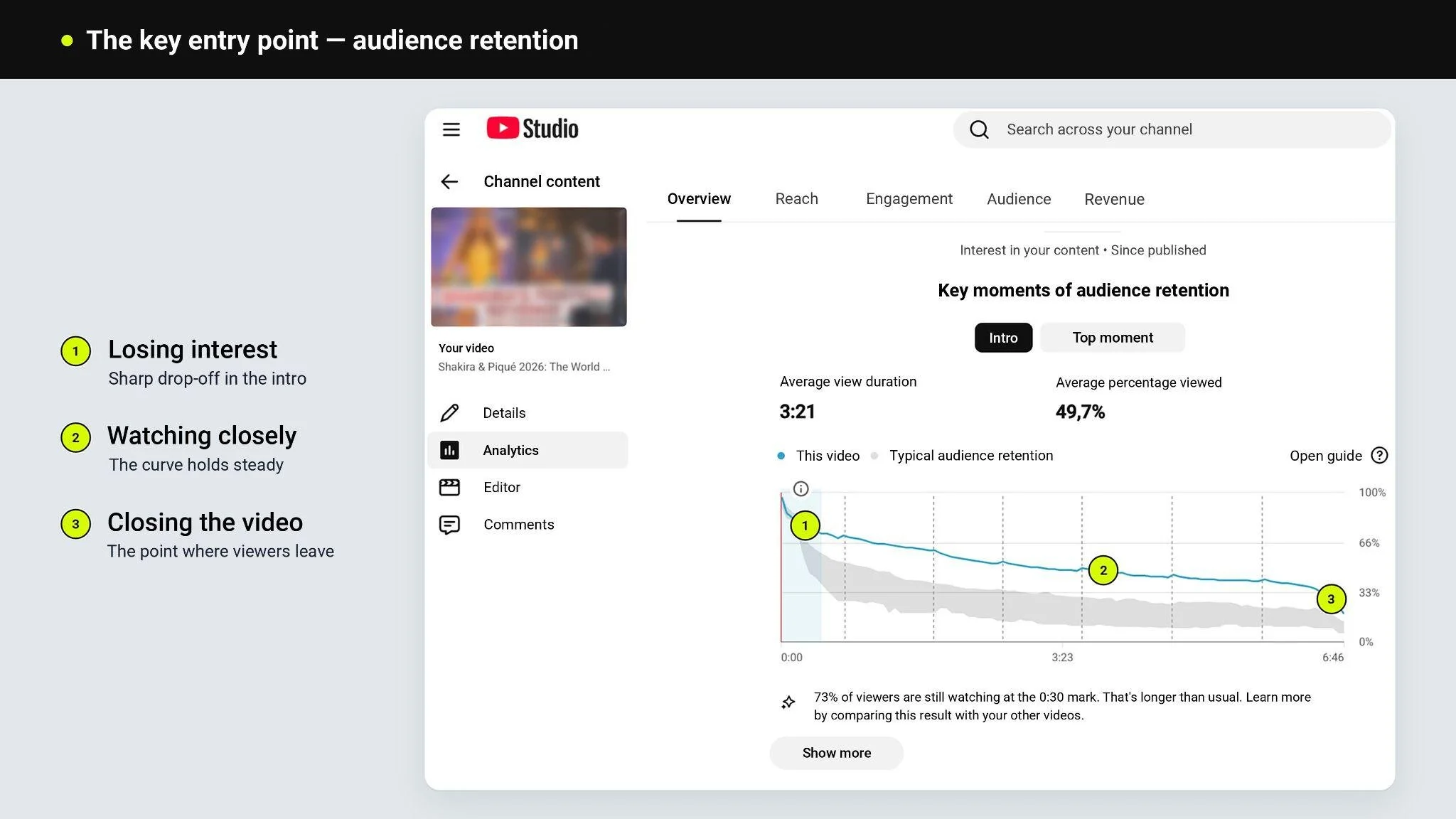
The key starting point is audience retention. The audience retention curve and Average View Duration help you understand how viewer attention changes throughout a video: where viewers stay engaged, where they lose interest, and where they leave. It is one of the most honest tools a creator has for evaluating their editing.
Impressions CTR shows how effectively the thumbnail and title work together when a video is shown to viewers. Combined with traffic sources, the metric provides much more insight than it does on its own. For example, a sharp drop in CTR alongside a decline in Browse traffic may be a signal that the video's packaging needs to be revisited - particularly the title and thumbnail. On the other hand, if CTR remains stable while impressions decline, the issue may have less to do with the title or thumbnail and more to do with demand for the topic, competition, or how recommendations are being distributed.
The traffic sources report shows exactly where views are coming from: Browse, YouTube Search, Suggested Videos, playlists, external sources, and other traffic sources. For Shorts, Shorts Feed and Shorts Remix are shown separately. This helps you understand which sources are driving audience acquisition for the channel.
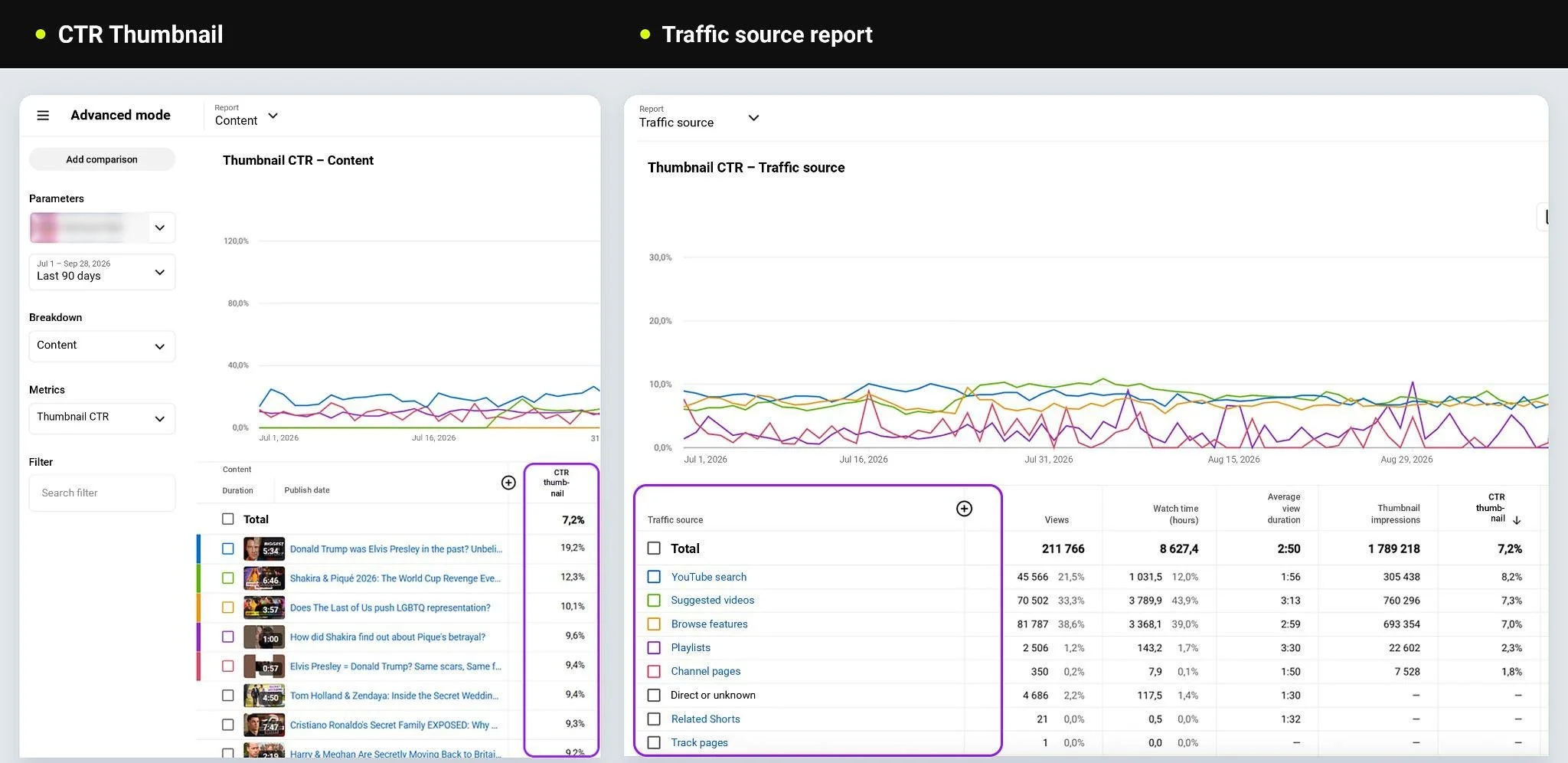
If most traffic comes from search, the channel is largely dependent on specific demand for topics and functions as a library of answers to users' queries. If Browse and Suggested Videos account for a significant share of views, the content largely scales through algorithmic distribution. As a result, the same number of views can come from completely different growth models.
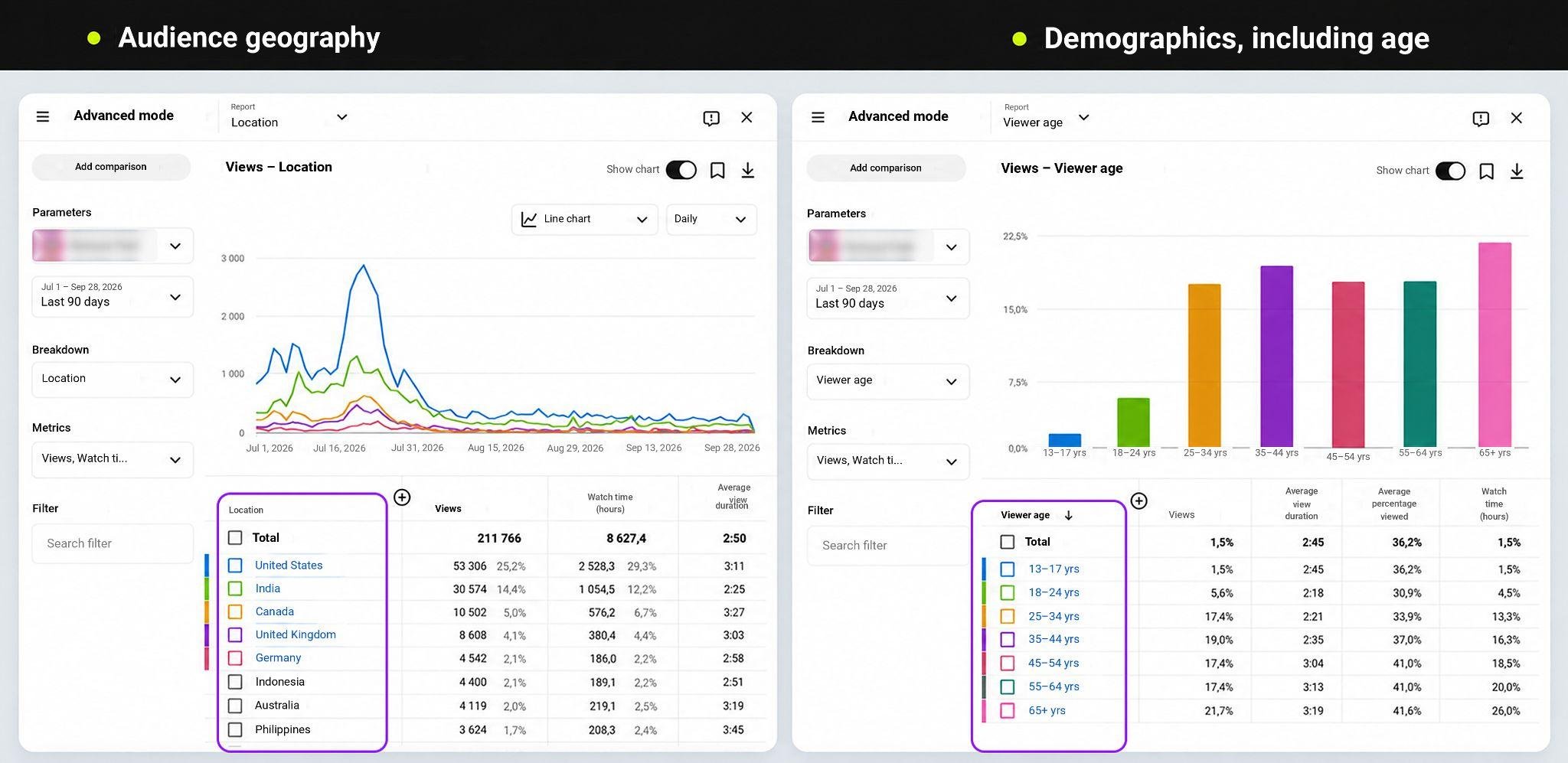
Audience geography shows which countries views are coming from and helps identify opportunities for localization - subtitles, dubbing, or separate language versions. For international channels, this information can become a foundation for expanding reach and unlocking additional revenue opportunities.
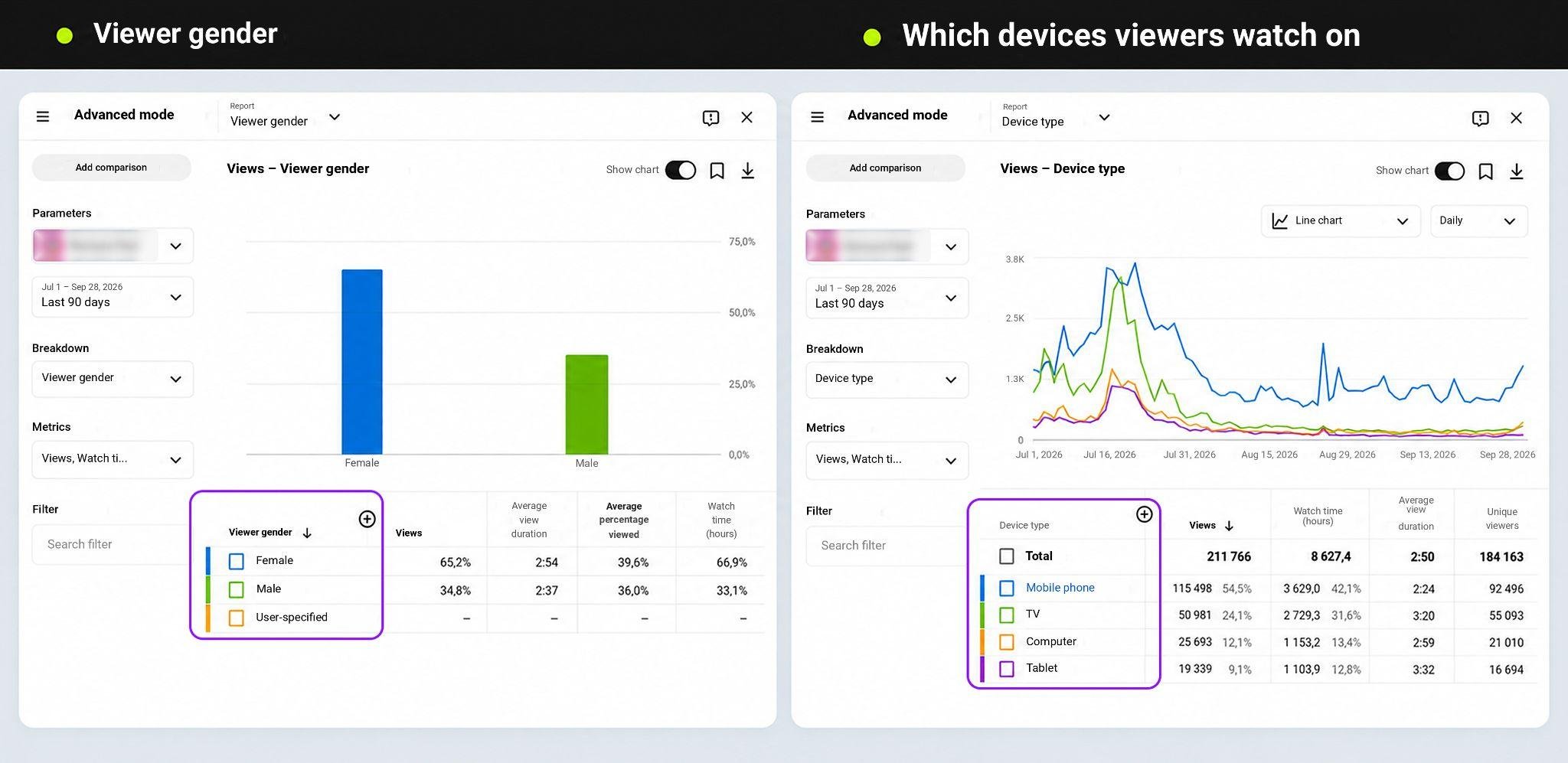
Demographic data, including audience age and gender, helps you understand who is actually watching your content. A clear understanding of your audience allows you to choose topics, style, and presentation more precisely, while also helping you position the channel more effectively to potential advertisers.
YouTube also shows which devices viewers use to watch content: smartphones, tablets, computers, TVs, and consoles. The distribution of views by device can help you adapt content to the way it is consumed. For example, if a significant share of views comes from TVs, it is worth keeping the large screen in mind when filming, working with text, and editing. If smartphones dominate, readable subtitles, fast-paced information delivery, and a strong opening become more important.
Advanced Mode also allows you to test content hypotheses. Compare lets you compare different periods using the same metrics, while Groups allows you to combine videos into separate groups and analyze them as individual samples. For example, you can create a group of 10 videos using a new format and another group of 10 using the old format, then compare their results. This makes it possible to test patterns across formats, periods, or content types.
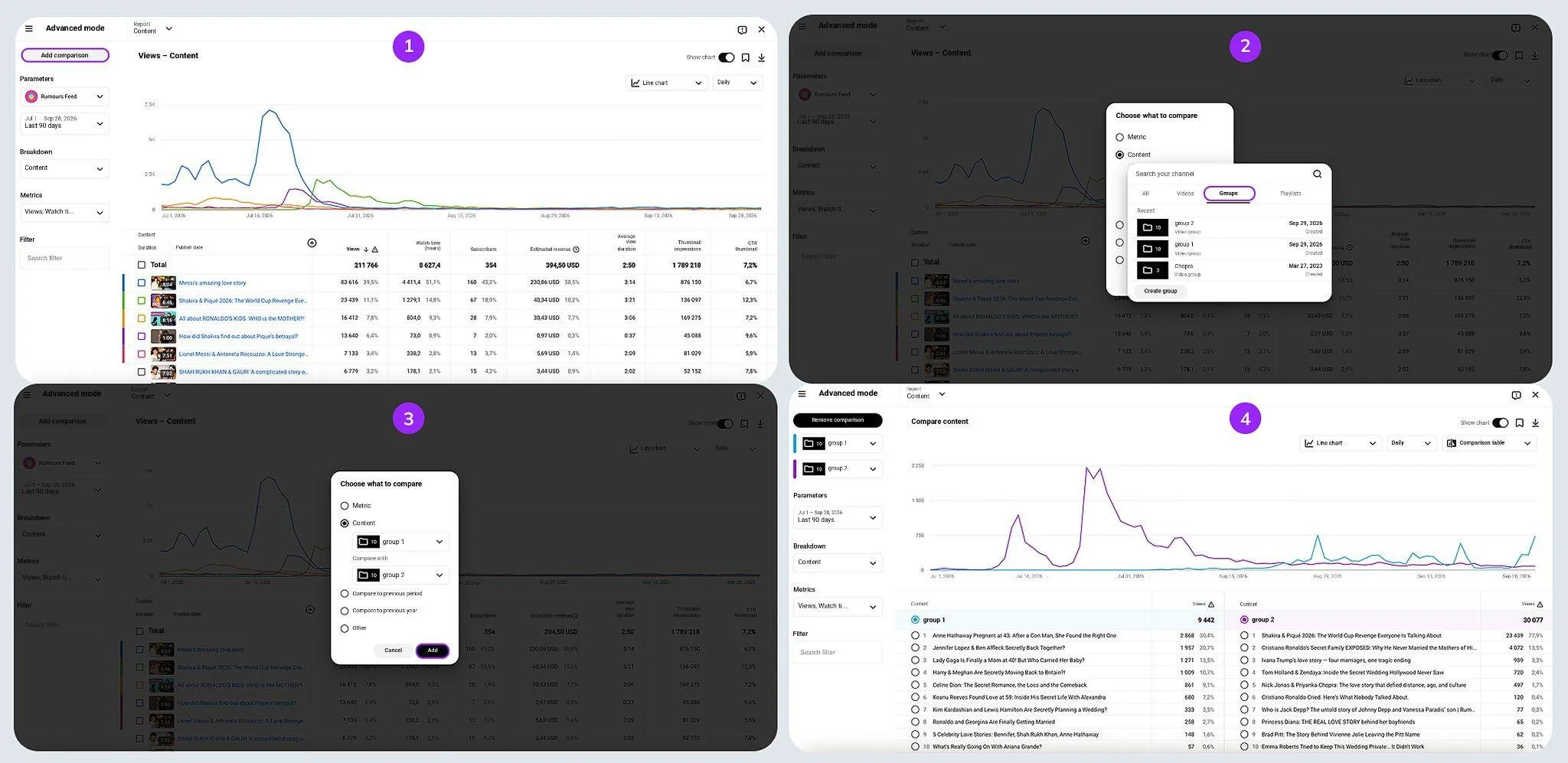
But even detailed internal analytics does not provide a complete picture of how a channel compares with the market.
How to Analyze YouTube Competitors
Which channels in the niche are growing the fastest? What topics, formats, and types of content are driving that growth? Which videos continue to gain views months after publication? Who consistently attracts new audiences, and whose growth can be attributed to a single viral video? Which topics are already oversaturated, and where is there still room to launch a new format?
These questions are relevant whether a creator works with a single channel or manages an entire content network. In the case of a network, the amount of data simply increases: you need not only to analyze competitors, but also to compare your own channels, identify growth opportunities, determine which formats are worth scaling, and decide which ones to move away from.
With your own channels, some of this work can be done directly in YouTube Studio. The downside is that you have to open the analytics for each channel separately and constantly switch between them. If you want to compare your channel with competitors, you would need to collect data manually through YouTube Search, rankings, thematic collections, and individual channel monitoring - or turn to external platforms that aggregate public data and allow you to work with it systematically. There are many such tools on the market, including some of the best-known options: Social Blade, vidIQ, TubeBuddy, and others.
YouTube Analytics Tools: Social Blade, vidIQ, and TubeBuddy

External services expand the capabilities of YouTube Studio and help creators work with channel performance, SEO, content, and the competitive landscape.
Social Blade: a quick overview of channel performance
Social Blade is a tool for an initial assessment of a channel and its competitive environment. The service shows trends in views, subscribers, and the number of published videos, daily changes, rankings, and other public metrics. You can compare channels and track changes in their key metrics over time.
Social Blade also provides estimated revenue figures. These should be treated as a reference rather than a channel's actual earnings: the service relies on public data and does not have access to internal monetization statistics.
vidIQ: SEO and finding growth opportunities
vidIQ is a tool for working with YouTube content strategy and SEO. It helps research keywords, assess their popularity and competitiveness, find topics for new videos, and explore content from other channels. The service can also suggest titles, descriptions, and tags to optimize videos for search queries and YouTube recommendations.
TubeBuddy: content optimization and analysis
TubeBuddy combines SEO tools, analytics, and content optimization features. Key capabilities include Keyword Explorer for researching search queries, SEO Studio for optimizing titles, descriptions, and tags, search ranking tracking, A/B testing, and competitor analysis.
These services are well suited to specific tasks - from keyword research and video optimization to competitor monitoring. But when you need to conduct comprehensive niche research, compare channels, and work with large amounts of data, a broader analytical approach is required. One such solution is SubSub Analytics.

SubSub Analytics: an MCN-level tool for creators
SubSub brings YouTube channel data together in a single workspace, allowing creators to systematically research the market, find competitors, compare results, and track changes within a niche. Essentially, creators get an MCN-level tool for managing channels.
The system combines two products: Sourcer, which helps find relevant channels, and Analytics, which allows you to collect them into collections and analyze them.
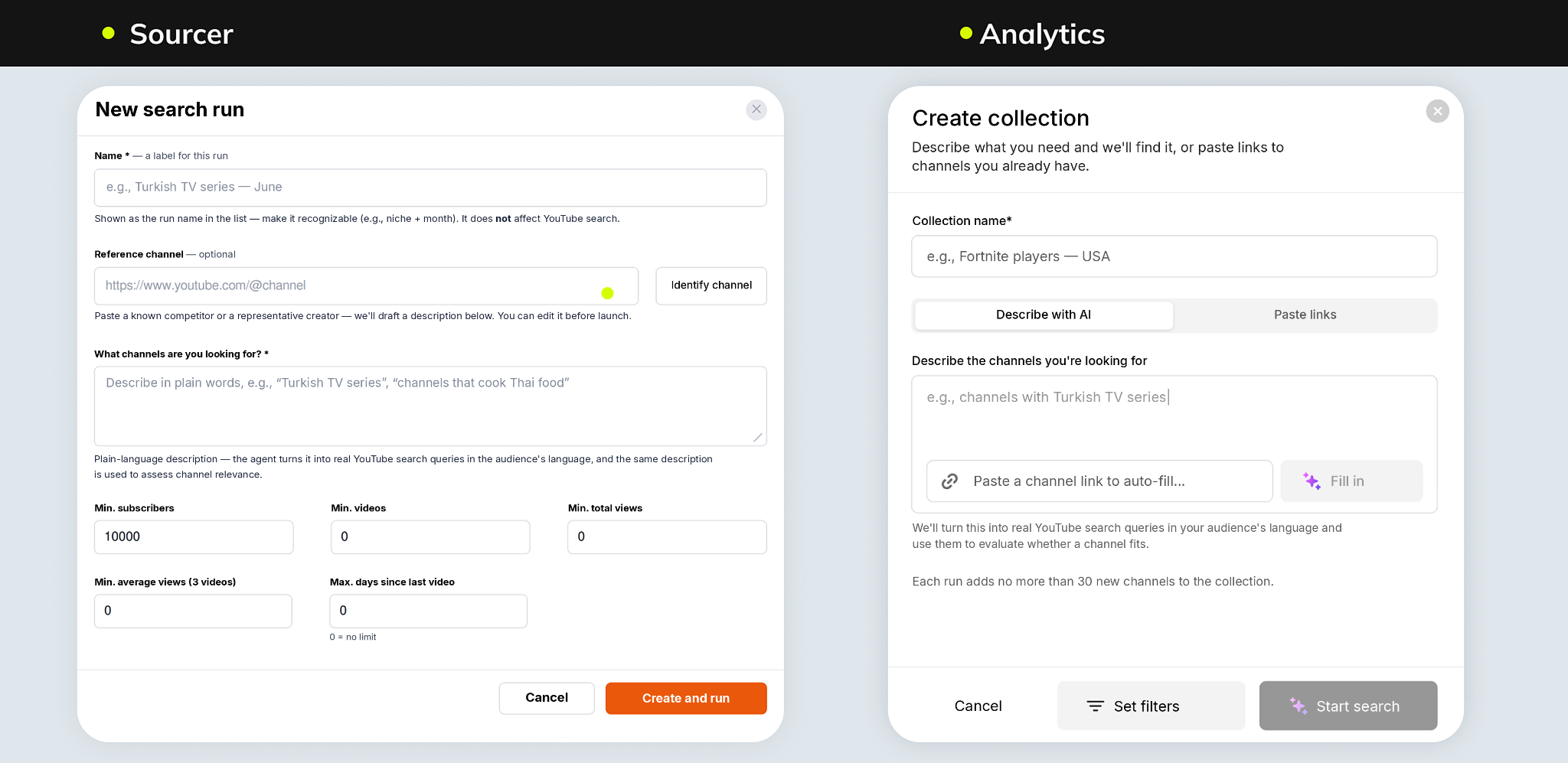
Sourcer: finding channels for a specific query
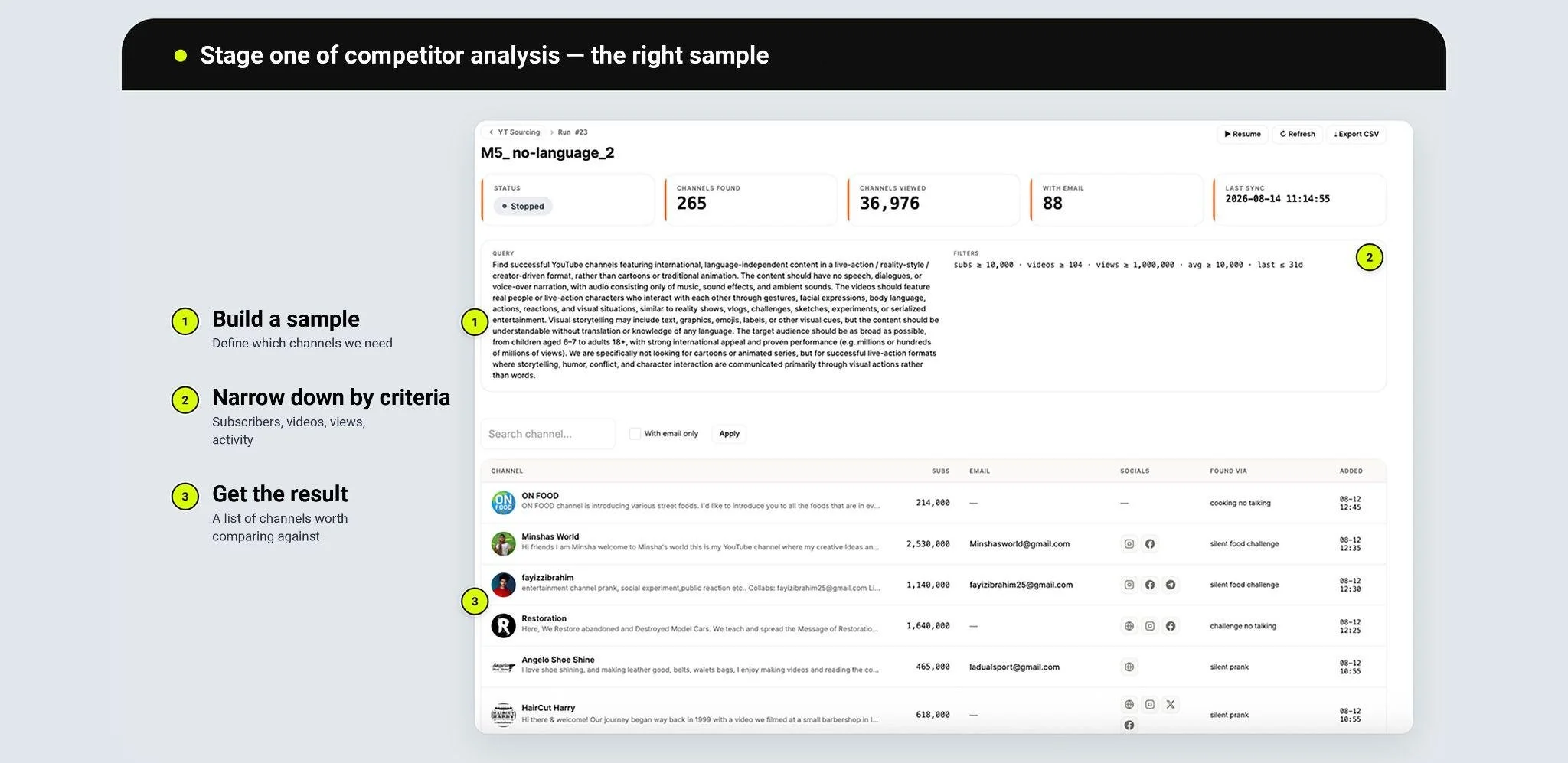
The first step in any competitive analysis is building the right sample. If the list of competitors is put together randomly, the conclusions drawn from it will be just as random.
A query in Sourcer can be formulated in natural language. For example, you may want to find channels with language-independent content for children - without dialogue or voice-over, making the content understandable to viewers regardless of their country or language. If you already have a competitor or reference channel, simply provide its link. The system can automatically generate a draft description for finding similar channels, which can then be edited if needed.
You can then narrow down the sample using specific criteria: minimum subscriber count, number of videos, total views, average views on the last three videos, or how recently the channel was active. The last criterion is particularly useful when you need to filter out channels that have effectively stopped operating.
For each channel found, you can get its name and link, as well as available contact details such as its website, Instagram, and email address. This means the same sample can be used both for competitive research and for finding potential partners or channels for outreach.
The scale of this type of search is illustrated by one of the runs: with a single query, the system reviewed nearly 37,000 channels and selected 265 relevant ones, 88 of which had a contact email. The full results can be exported to CSV.
Analytics: basic data
The second SubSub product is Analytics. It operates on two levels: basic and advanced data.
Basic analytics is built on an internal database of more than 2 million channels. You can find the channel you need through AI search by describing the required sample in natural language, or use classic filters to specify the country, language, and content topic. If the channel you need is not yet in the system, you can add it manually.
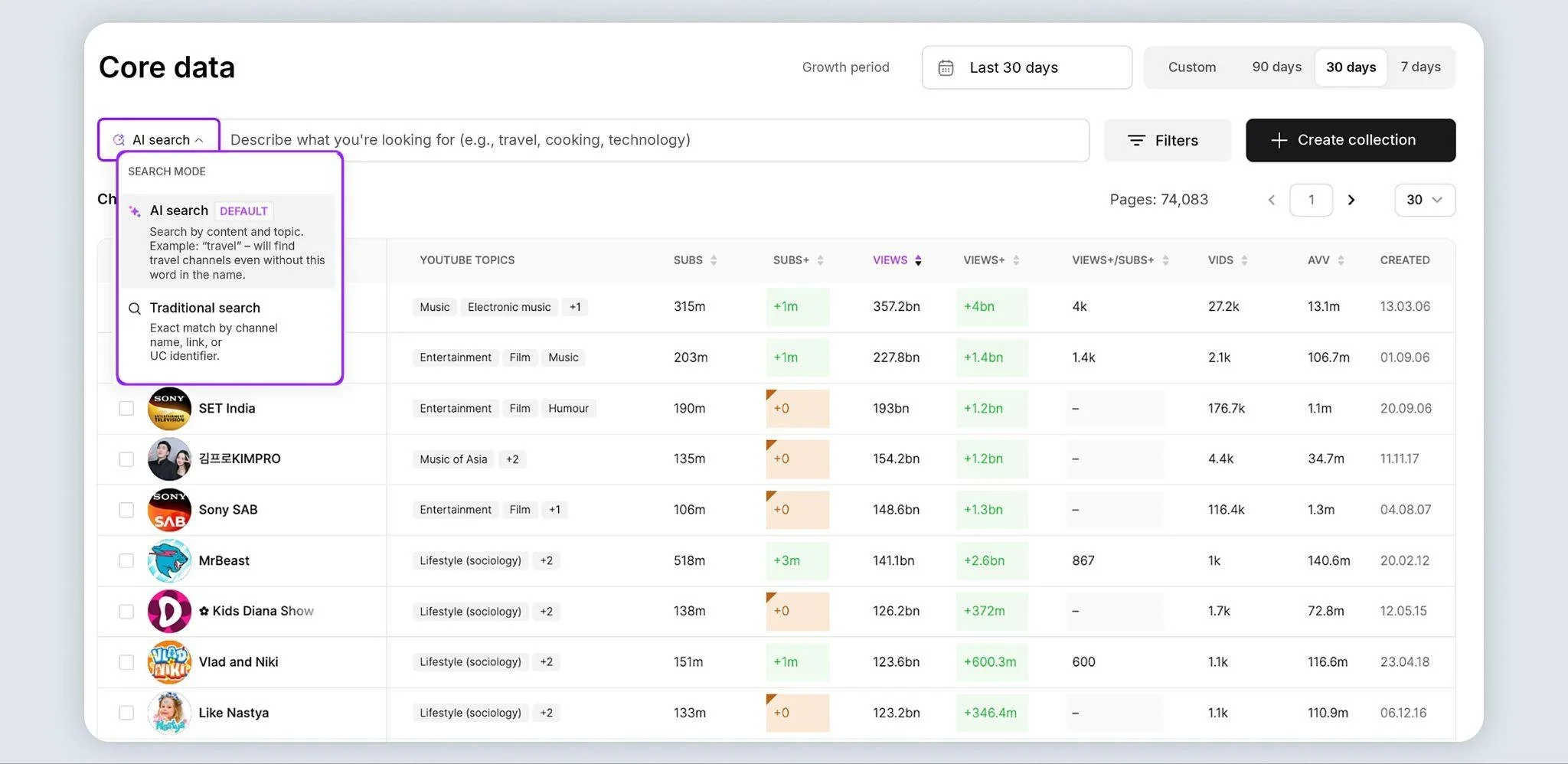
Once the sample is created, channels can be sorted by absolute subscriber or view counts, as well as subscriber and view growth: SUBS+, VIEWS+, and the VIEWS+/SUBS+ ratio.
The latter metric is particularly useful for comparing channels of different sizes: it shows how many views correspond to one new subscriber over the selected period. This helps identify channels that are currently more effective at converting views into audience growth.
Advanced data: who creates evergreen topics and knows how to attract an audience
Advanced analytics works with collections - groups of channels created for a specific purpose: your own channels, direct competitors, niche leaders, or potential reference points for a new format.
After selecting a collection and time period, you can see subscriber and view counts, their growth over the selected period - SUBS+ and VIEWS+ - as well as other growth metrics. You can choose which columns to display.
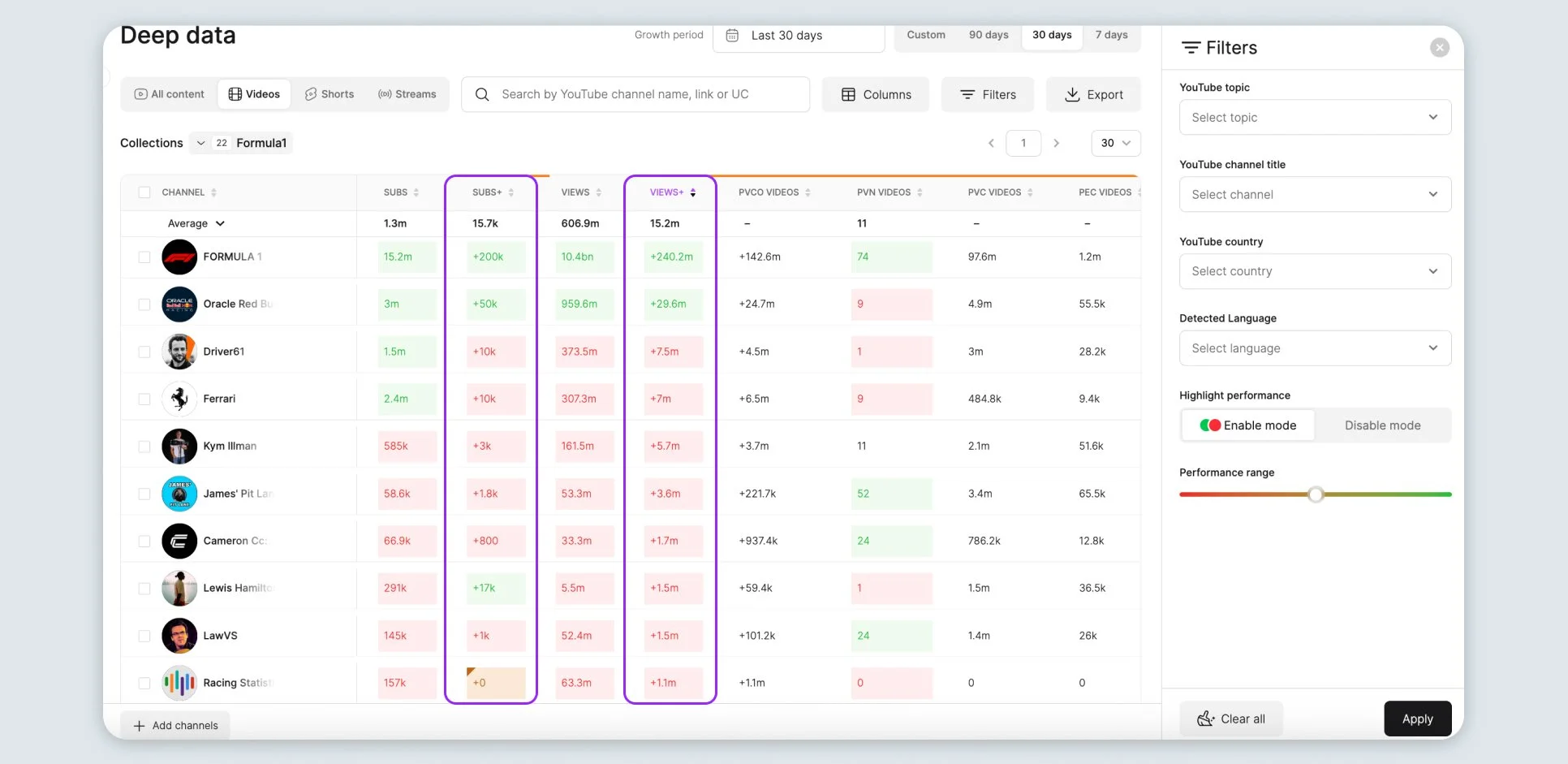
Another question you can explore here is where exactly a channel's growth is coming from. This is where PVC comes in - the number of views generated by videos published during the selected period. Comparing PVC with overall view growth makes it easier to understand whether a channel is generating new traffic through fresh uploads or whether a significant share of its views continues to come from its existing content library.
A high PVC means that most views are generated by new videos. If PVC is low but VIEWS+ is high, the situation is different: a significant share of traffic may be coming from older videos that continue to gain views long after publication. This matters because such a content library can keep working for months and reduce a channel's dependence on constantly publishing new videos.
Advanced analytics also allows you to review video performance. Within a selected collection and time period, you can see which competitor videos received the most views and engagement, when they were published, and what their titles and thumbnails looked like.
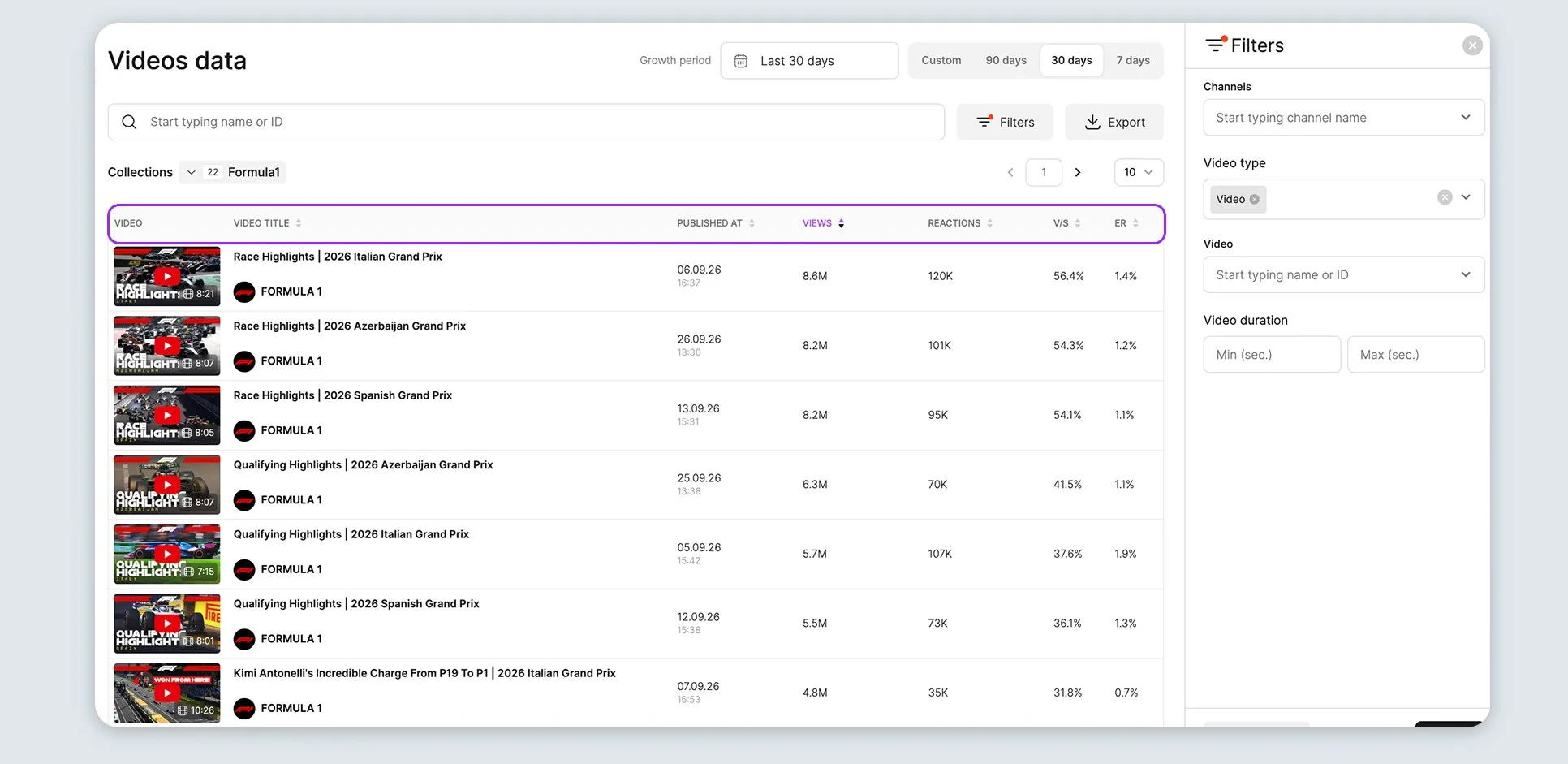
Sourcer and Analytics cover different stages of the same process. Sourcer helps you find channels worth researching, while Analytics helps you understand what is happening with those channels. Based on this data, teams can identify patterns and develop their own content hypotheses.
However, the value of advanced analytics is not simply in monitoring competitors.
The tool does not replace the work - it shortens the path to a decision
You can connect dozens of analytics services, choose the most expensive plans, and receive hundreds of metrics every day. But none of them will change your channel on their own. Data becomes valuable when a creator or team is ready to use it and turn it into specific decisions.
The tool becomes truly useful when questions come up every morning: What is working for competitors right now? Which topics are gaining popularity? How has the data for our own channel changed over the last 48 hours? What can we improve in the next video?
Working on YouTube is not limited to two actions: creating videos and waiting for the results. It is a continuous cycle: watching the market, analyzing your own performance, challenging your assumptions, testing new ideas, and looking at the numbers again.
And most importantly, you should genuinely enjoy coming back to the data, looking for answers, and getting better every day.